Sales and visibility
AI CRM and sales operations
The CRM stores information but does no work.
The problem
Why it happens.
Most CRMs are bought to solve a reporting problem and then set up in a hurry. The stages are copied from a template, the fields multiply, and updating records becomes a chore that adds nothing to a salesperson’s day. Once people stop updating it, the data goes stale and the reports stop being trusted.
The CRM then becomes somewhere information is stored after the work is done, when it should be where the work happens. Follow-up is tracked in inboxes and notebooks, and the manager asks for updates in meetings. Changing platform rarely fixes this on its own, because the problem lies in the pipeline design and the missing automation.
Signs you have this problem
- The team updates the CRM on Friday afternoon, if at all.
- Deals sit in the same stage for weeks.
- Pipeline reports are put together by hand in a spreadsheet.
- Nobody can say which enquiries are still waiting for a reply.
- Leads from the website, calls and adverts are logged in different ways, or not logged at all.
The answer
In plain terms.
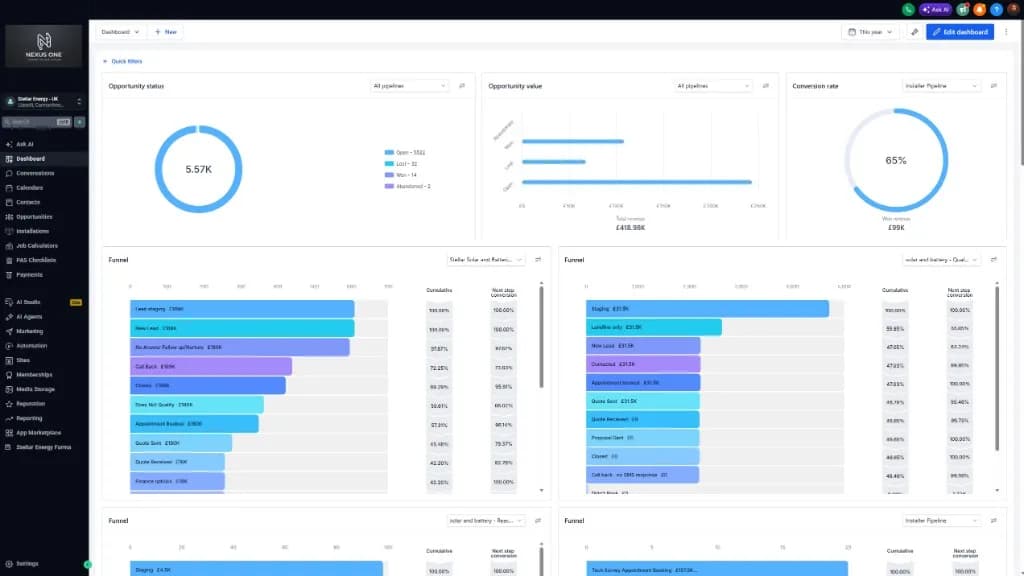
A CRM that only stores contacts is an expensive address book. AI CRM and sales operations make it do the work: capturing every enquiry, qualifying it, following up, booking the next step and reporting on the pipeline. We either configure the platform you already pay for or set up Nexus One, our AI CRM and business automation product, when that is the better fit.
What changes
The pipeline reflects reality, and follow-up runs itself.
How it works
- 01
Review the current setup
We look at how leads arrive, how the pipeline is structured and where records go stale.
- 02
Design the pipeline
Stages that match how you sell, with clear rules for what moves a deal from one stage to the next.
- 03
Automate the routine steps
Capture, qualification questions, follow-up, booking and task creation run inside the CRM.
- 04
Report on what is real
Dashboards show the pipeline as it stands, built from activity the system records rather than from manual updates.
A typical rollout
From first call to live.
Timings are a rough guide. They depend on your systems, your availability and what the discovery work finds.
- 01 · First week or two
Review and design
We review how leads arrive and how you sell, then design the stages, the fields and the rules that move a deal along.
- 02 · The next few weeks
Clean and configure
Data is tidied, the pipeline is configured in your CRM or Nexus One, and your lead sources are connected.
- 03 · Around the end of the first month, or a little later
Automate and train
Follow-up, booking and task creation are switched on, and the team is trained on the new way of working.
- 04 · Monthly
Report and refine
Dashboards are checked against what is happening on the ground, and stages or rules are adjusted where deals get stuck.
What you get
- A pipeline designed around how you sell
- Automated capture from your lead sources
- Follow-up and booking that run inside the CRM
- Dashboards for pipeline, conversion and activity
- Either your existing CRM configured, or Nexus One set up
What it connects to
- Existing CRM such as GoHighLevel or HubSpot
- Website forms
- Phone and calling tools
- Calendar
- Email and SMS
Who it suits
- Businesses with a CRM that the team avoids updating
- Sales teams that cannot see which deals are moving
- Companies outgrowing spreadsheets for tracking enquiries
A typical example
How it plays out.
A kitchen fitting company tracks enquiries in a CRM, but the stages are out of date and follow-up depends on whoever remembers. After the pipeline is redesigned, each new enquiry is captured from the website, asked a few qualifying questions, offered a design visit and moved along as it progresses. The sales manager’s dashboard shows the pipeline from the activity the system has recorded.
A generic scenario to show how the work runs. It does not describe a specific client.
Measuring it
How you know it is working.
- Leads with an owner and a next action
- This is the simplest test of whether the CRM is doing work. Any lead without both is at risk of going cold.
- Time deals spend in each stage
- Long waits show where the process stalls and where automation or a rule change would help.
- Conversion between stages
- Taken from recorded activity, this shows where deals are won and lost without relying on anyone’s impression.
- Updates made by the system compared with by hand
- The more updates come from captured activity, the more the pipeline reflects what happened and the less admin the team carries.
- Daily use by the team
- If people open the CRM and work from it each day, it has become the place the work happens.
Risks and safeguards
What could go wrong, and what stops it.
Risk
Automation sends the wrong message to the wrong person.
Safeguard
Every automated message and rule is approved before launch and tested on dummy records, and sequences stop when a person replies.
Risk
Data is lost or damaged during clean-up or migration.
Safeguard
A full export is taken before any change, and the clean-up is checked in stages before the old setup is retired.
Risk
Too many people can see or export customer data.
Safeguard
Roles limit who can see, edit and export records, set to match each person’s job.
Risk
Contact preferences are ignored.
Safeguard
Opt-outs and consent are recorded on the contact and respected by every automation, in line with UK GDPR and PECR.
Risk
The new pipeline drifts back into an unused list.
Safeguard
Monthly reviews check that each stage still means the same thing to everyone, and that the dashboards match what the team sees on the ground.
Questions
What people ask about this.
Do we have to switch to Nexus One?
No. We often configure the CRM you already have. Nexus One is an option when the current platform cannot do what you need.
How much does Nexus One cost?
Nexus One is scoped per engagement because the work depends on how many systems it has to join up. Consulting retainers are published on the packages page.
Can it work with our phone system?
Yes. Calls, including those handled by Echo One, can be logged against the right contact with the outcome and next task.
Can you clean up our existing data?
Yes, as part of the setup. Duplicate contacts, stale deals and inconsistent fields are tidied so the new pipeline starts from records the team can trust.
Will the team need training?
Yes, and it is part of the work. Each stage, rule and dashboard is explained to the people who use them, with written guidance to keep.
What does the AI do inside the CRM?
The routine work: capturing enquiries, asking qualifying questions, scoring leads on fit, intent and urgency, sending follow-up and creating the next task. People still make the decisions on deals.
Read the detail
More in sales and visibility
Next step
Start with the free AI Opportunity Assessment.
A short, no-obligation conversation about where your business is losing enquiries, hours and revenue. You do not need to choose a package first, and whatever we find carries straight into your audit, so your first paid day starts from evidence.